geo_closest_point_on_line()
Calculates a point on a line or a multiline, which is closest to a given point on Earth.
Syntax
geo_closest_point_on_line(longitude,latitude,lineString)
Parameters
| Name | Type | Required | Description |
|---|---|---|---|
| longitude | real | ✔️ | The geospatial coordinate longitude value in degrees. A valid value is in the range [-180, +180]. |
| latitude | real | ✔️ | The geospatial coordinate latitude value in degrees. A valid value is in the range [-90, +90]. |
| lineString | dynamic | ✔️ | A line or multiline in the GeoJSON format. |
Returns
A point in GeoJSON Format and of a dynamic data type on a line or multiline which is the closest to a given point on Earth. If the coordinate or lineString are invalid, the query produces a null result.
LineString definition and constraints
dynamic({“type”: “LineString”,“coordinates”: [[lng_1,lat_1], [lng_2,lat_2],…, [lng_N,lat_N]]})
dynamic({“type”: “MultiLineString”,“coordinates”: [[line_1, line_2, …, line_N]]})
- LineString coordinates array must contain at least two entries.
- Coordinates [longitude, latitude] must be valid where longitude is a real number in the range [-180, +180] and latitude is a real number in the range [-90, +90].
- Edge length must be less than 180 degrees. The shortest edge between the two vertices is chosen.
Examples
The following example finds the point on a road which is the closest to North Las Vegas Airport.
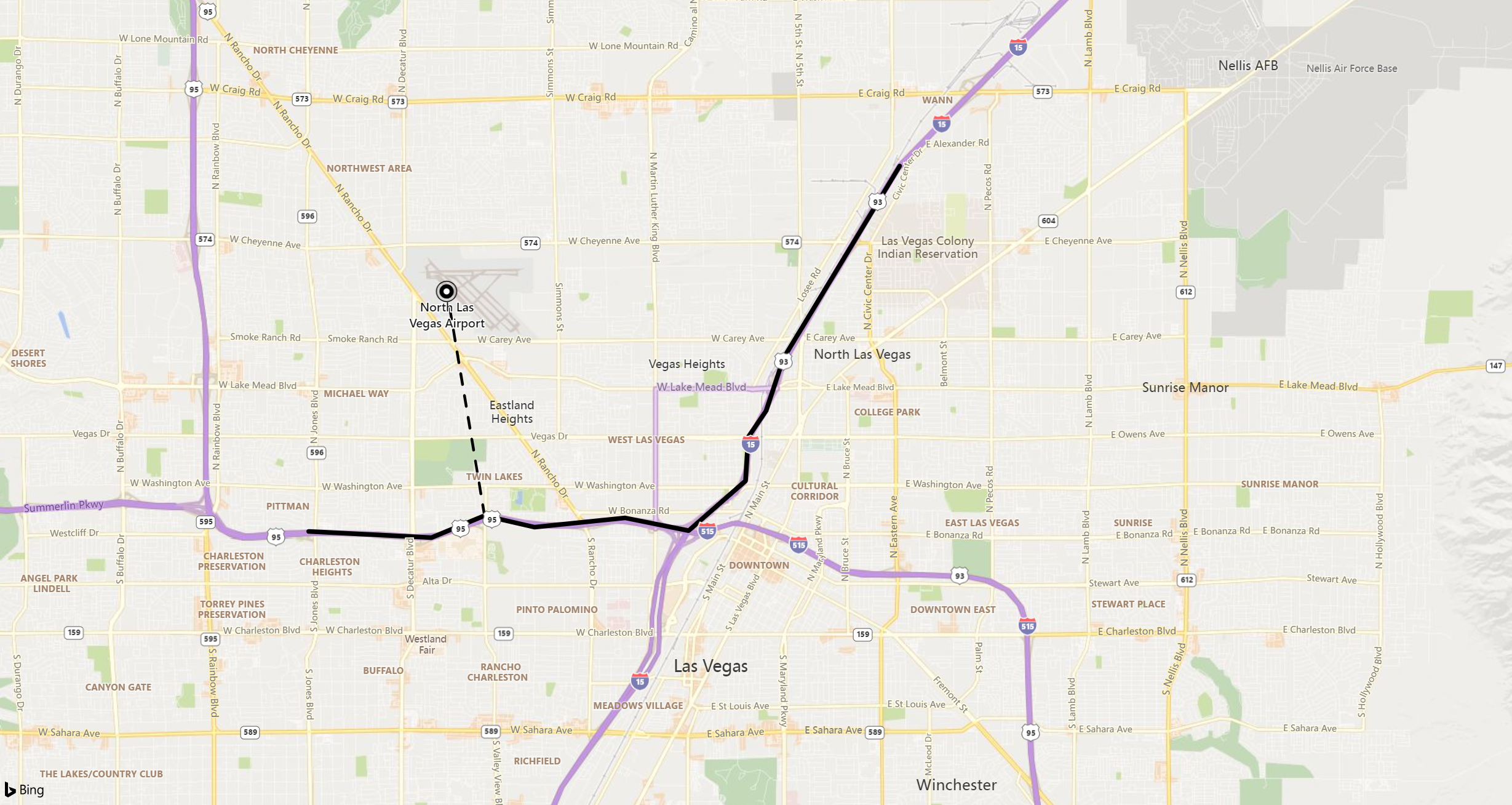
print point_on_line = geo_closest_point_on_line(-115.199625, 36.210419, dynamic({ "type":"LineString","coordinates":[[-115.115385,36.229195],[-115.136995,36.200366],[-115.140252,36.192470],[-115.143558,36.188523],[-115.144076,36.181954],[-115.154662,36.174483],[-115.166431,36.176388],[-115.183289,36.175007],[-115.192612,36.176736],[-115.202485,36.173439],[-115.225355,36.174365]]}))
Output
| point_on_line |
|---|
| { “type”: “Point”, “coordinates”: [ -115.192612, 36.176736]} |
The following example returns a null result because of the invalid LineString input.
print isnull(geo_closest_point_on_line(1,1, dynamic({ "type":"LineString"})))
Output
| result |
|---|
| true |
The following example returns a null result because of the invalid coordinate input.
print result = isnull(geo_closest_point_on_line(300, 3, dynamic({ "type":"LineString","coordinates":[[1,1],[2,2]]})))
Output
| result |
|---|
| true |
Feedback
Was this page helpful?
Glad to hear it! Please tell us how we can improve.
Sorry to hear that. Please tell us how we can improve.