bag_unpack plugin
The bag_unpack plugin unpacks a single column of type dynamic, by treating each property bag top-level slot as a column. The plugin is invoked with the evaluate operator.
Syntax
T | evaluate bag_unpack( Column [, OutputColumnPrefix ] [, columnsConflict ] [, ignoredProperties ] ) [: OutputSchema]
Parameters
| Name | Type | Required | Description |
|---|---|---|---|
| T | string | ✔️ | The tabular input whose column Column is to be unpacked. |
| Column | dynamic | ✔️ | The column of T to unpack. |
| OutputColumnPrefix | string | A common prefix to add to all columns produced by the plugin. | |
| columnsConflict | string | The direction for column conflict resolution. Valid values:error - Query produces an error (default)replace_source - Source column is replacedkeep_source - Source column is kept | |
| ignoredProperties | dynamic | An optional set of bag properties to be ignored. } | |
| OutputSchema | Specify the column names and types for the bag_unpack plugin output. For syntax information, see Output schema syntax, and to understand the implications, see Performance considerations. |
Output schema syntax
( ColumnName : ColumnType [, …] )
Use a wildcard * as the first parameter to include all columns of the source table in the output, as follows:
( * , ColumnName : ColumnType [, …] )
Performance considerations
Using the plugin without an OutputSchema can have severe performance implications in large datasets and should be avoided.
Providing an OutputSchema allows the query engine to optimize the query execution, as it can determine the output schema without needing to parse and analyze the input data. OutputSchema is beneficial when the input data is large or complex. See the Examples with performance implications of using the plugin with and without a defined OutputSchema.
Returns
The bag_unpack plugin returns a table with as many records as its tabular input (T). The schema of the table is the same as the schema of its tabular input with the following modifications:
- The specified input column (Column) is removed.
- The name of each column corresponds to the name of each slot, optionally prefixed by OutputColumnPrefix.
- The type of each column is either the type of the slot, if all values of the same slot have the same type, or
dynamic, if the values differ in type. - The schema is extended with as many columns as there are distinct slots in the top-level property bag values of T.
Tabular schema rules apply to the input data. In particular:
- An output column name can’t be the same as an existing column in the tabular input T, unless it’s the column to unpack (Column). Otherwise, the output includes two columns with the same name.
- All slot names, when prefixed by OutputColumnPrefix, must be valid entity names and follow the identifier naming rules.
The plugin ignores null values.
Examples
The examples in this section show how to use the syntax to help you get started.
Expand a bag:
datatable(d:dynamic)
[
    dynamic({"Name": "John", "Age":20}),
    dynamic({"Name": "Dave", "Age":40}),
    dynamic({"Name": "Jasmine", "Age":30}),
]
| evaluate bag_unpack(d)
Output
Age | Name |
|---|---|
| 20 | John |
| 40 | Dave |
| 30 | Jasmine |
Expand a bag and use the OutputColumnPrefix option to produce column names with a prefix:
datatable(d:dynamic)
[
    dynamic({"Name": "John", "Age":20}),
    dynamic({"Name": "Dave", "Age":40}),
    dynamic({"Name": "Jasmine", "Age":30}),
]
| evaluate bag_unpack(d, 'Property_')
Output
Property_Age | Property_Name |
|---|---|
| 20 | John |
| 40 | Dave |
| 30 | Jasmine |
Expand a bag and use the columnsConflict option to resolve a column conflict between the dynamic column and the existing column:
datatable(Name:string, d:dynamic)
[
    'James', dynamic({"Name": "John", "Age":20}),
    'David', dynamic({ "Age":40}),
    'Emily', dynamic({"Name": "Jasmine", "Age":30}),
]
| evaluate bag_unpack(d, columnsConflict='replace_source') // Replace old column Name by new column
Output
Name | Age |
|---|---|
| John | 20 |
| 40 | |
| Jasmine | 30 |
datatable(Name:string, d:dynamic)
[
    'James', dynamic({"Name": "John", "Age":20}),
    'David', dynamic({"Name": "Dave", "Age":40}),
    'Emily', dynamic({"Name": "Jasmine", "Age":30}),
]
| evaluate bag_unpack(d, columnsConflict='keep_source') // Keep old column Name
Output
Name | Age |
|---|---|
| James | 20 |
| David | 40 |
| Emily | 30 |
Expand a bag and use the ignoredProperties option to ignore 2 of the properties in the property bag:
datatable(d:dynamic)
[
    dynamic({"Name": "John", "Age":20, "Address": "Address-1" }),
    dynamic({"Name": "Dave", "Age":40, "Address": "Address-2"}),
    dynamic({"Name": "Jasmine", "Age":30, "Address": "Address-3"}),
]
// Ignore 'Age' and 'Address' properties
| evaluate bag_unpack(d, ignoredProperties=dynamic(['Address', 'Age']))
Output
Name |
|---|
| John |
| Dave |
| Jasmine |
Expand a bag and use the OutputSchema option:
datatable(d:dynamic)
[
    dynamic({"Name": "John", "Age":20}),
    dynamic({ "Name": "Dave", "Height": 170, "Age":40}),
    dynamic({"Name": "Jasmine", "Age":30}),
]
| evaluate bag_unpack(d)
Output
Age | Height | Name |
|---|---|---|
| 20 | John | |
| 40 | 170 | Dave |
| 30 | Jasmine |
Expand a bag with an OutputSchema and use the wildcard * option:
This query returns the original slot Description and the columns defined in the OutputSchema.
datatable(d:dynamic, Description: string)
[
    dynamic({"Name": "John", "Age":20, "height":180}), "Student",
    dynamic({"Name": "Dave", "Age":40, "height":160}), "Teacher",
    dynamic({"Name": "Jasmine", "Age":30, "height":172}), "Student",
]
| evaluate bag_unpack(d) : (*, Name:string, Age:long)
Output
| Description | Name | Age |
|---|---|---|
| Student | John | 20 |
| Teacher | Dave | 40 |
| Student | Jasmine | 30 |
Examples with performance implications
Expand a bag with and without a defined OutputSchema to compare performance implications:
This example uses a publicly available table in the help cluster. In the ContosoSales database, there’s a table called SalesDynamic. The table contains sales data and includes a dynamic column named Customer_Properties.
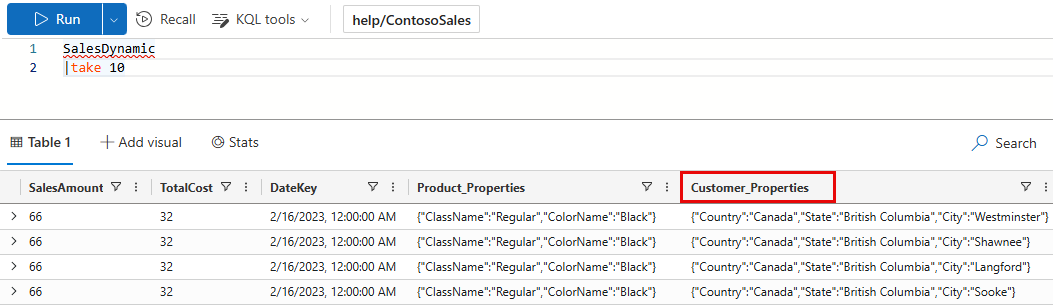
Example with no output schema: The first query doesn’t define an OutputSchema. The query takes 5.84 seconds of CPU and scans 36.39 MB of data.
[!div class=“nextstepaction”] Run the query
SalesDynamic
| evaluate bag_unpack(Customer_Properties)
| summarize Sales=sum(SalesAmount) by Country, State
Example with output schema: The second query does provide an OutputSchema. The query takes 0.45 seconds of CPU and scans 19.31 MB of data. The query doesn’t have to analyze the input table, saving on processing time.
[!div class=“nextstepaction”] Run the query
SalesDynamic
| evaluate bag_unpack(Customer_Properties) :  (*, Country:string, State:string, City:string)
| summarize Sales=sum(SalesAmount) by Country, State
Output
The output is the same for both queries. The first 10 rows of the output are shown below.
Country/Region | State | Sales |
|---|---|---|
| Canada | British Columbia | 56,101,083 |
| United Kingdom | England | 77,288,747 |
| Australia | Victoria | 31,242,423 |
| Australia | Queensland | 27,617,822 |
| Australia | South Australia | 8,530,537 |
| Australia | New South Wales | 54,765,786 |
| Australia | Tasmania | 3,704,648 |
| Canada | Alberta | 375,061 |
| Canada | Ontario | 38,282 |
| United States | Washington | 80,544,870 |
| … | … | … |
Related content
Feedback
Was this page helpful?
Glad to hear it! Please tell us how we can improve.
Sorry to hear that. Please tell us how we can improve.