join operator
Merge the rows of two tables to form a new table by matching values of the specified columns from each table.
Kusto Query Language (KQL) offers many kinds of joins that each affect the schema and rows in the resultant table in different ways. For example, if you use an inner join, the table has the same columns as the left table, plus the columns from the right table. For best performance, if one table is always smaller than the other, use it as the left side of the join operator.
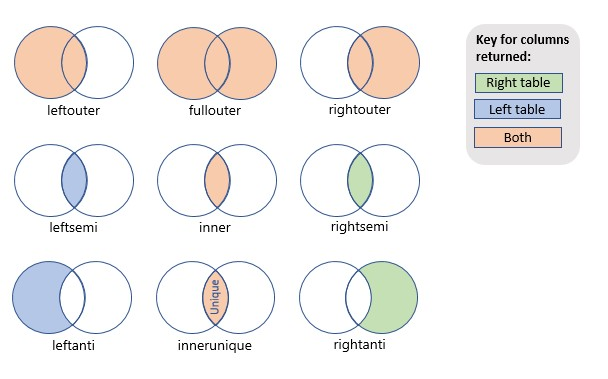
The following image provides a visual representation of the operation performed by each join. The color of the shading represents the columns returned, and the areas shaded represent the rows returned.
Syntax
LeftTable | join [ kind = JoinFlavor ] [ Hints ] (RightTable) on Conditions
Parameters
| Name | Type | Required | Description |
|---|---|---|---|
| LeftTable | string | ✔️ | The left table or tabular expression, sometimes called the outer table, whose rows are to be merged. Denoted as $left. |
| JoinFlavor | string | The type of join to perform: innerunique, inner, leftouter, rightouter, fullouter, leftanti, rightanti, leftsemi, rightsemi. The default is innerunique. For more information about join flavors, see Returns. | |
| Hints | string | Zero or more space-separated join hints in the form of Name = Value that control the behavior of the row-match operation and execution plan. For more information, see Hints. | |
| RightTable | string | ✔️ | The right table or tabular expression, sometimes called the inner table, whose rows are to be merged. Denoted as $right. |
| Conditions | string | ✔️ | Determines how rows from LeftTable are matched with rows from RightTable. If the columns you want to match have the same name in both tables, use the syntax ON ColumnName. Otherwise, use the syntax ON $left.LeftColumn == $right.RightColumn. To specify multiple conditions, you can either use the “and” keyword or separate them with commas. If you use commas, the conditions are evaluated using the “and” logical operator. |
Hints
| Hint key | Values | Description |
|---|---|---|
hint.remote | auto, left, local, right | See Cross-Cluster Join |
hint.strategy=broadcast | Specifies the way to share the query load on cluster nodes. | See broadcast join |
hint.shufflekey=<key> | The shufflekey query shares the query load on cluster nodes, using a key to partition data. | See shuffle query |
hint.strategy=shuffle | The shuffle strategy query shares the query load on cluster nodes, where each node processes one partition of the data. | See shuffle query |
| Name | Values | Description |
|---|---|---|
hint.remote | auto, left, local, right | |
hint.strategy=broadcast | Specifies the way to share the query load on cluster nodes. | See broadcast join |
hint.shufflekey=<key> | The shufflekey query shares the query load on cluster nodes, using a key to partition data. | See shuffle query |
hint.strategy=shuffle | The shuffle strategy query shares the query load on cluster nodes, where each node processes one partition of the data. | See shuffle query |
Returns
The return schema and rows depend on the join flavor. The join flavor is specified with the kind keyword. The following table shows the supported join flavors. To see examples for a specific join flavor, select the link in the Join flavor column.
| Join flavor | Returns | Illustration |
|---|---|---|
| innerunique (default) | Inner join with left side deduplication Schema: All columns from both tables, including the matching keys Rows: All deduplicated rows from the left table that match rows from the right table | :::image type=“icon” source=“media/joinoperator/join-innerunique.png” border=“false”::: |
| inner | Standard inner join Schema: All columns from both tables, including the matching keys Rows: Only matching rows from both tables | :::image type=“icon” source=“media/joinoperator/join-inner.png” border=“false”::: |
| leftouter | Left outer join Schema: All columns from both tables, including the matching keys Rows: All records from the left table and only matching rows from the right table | :::image type=“icon” source=“media/joinoperator/join-leftouter.png” border=“false”::: |
| rightouter | Right outer join Schema: All columns from both tables, including the matching keys Rows: All records from the right table and only matching rows from the left table | :::image type=“icon” source=“media/joinoperator/join-rightouter.png” border=“false”::: |
| fullouter | Full outer join Schema: All columns from both tables, including the matching keys Rows: All records from both tables with unmatched cells populated with null | :::image type=“icon” source=“media/joinoperator/join-fullouter.png” border=“false”::: |
| leftsemi | Left semi join Schema: All columns from the left table Rows: All records from the left table that match records from the right table | :::image type=“icon” source=“media/joinoperator/join-leftsemi.png” border=“false”::: |
leftanti, anti, leftantisemi | Left anti join and semi variant Schema: All columns from the left table Rows: All records from the left table that don’t match records from the right table | :::image type=“icon” source=“media/joinoperator/join-leftanti.png” border=“false”::: |
| rightsemi | Right semi join Schema: All columns from the right table Rows: All records from the right table that match records from the left table | :::image type=“icon” source=“media/joinoperator/join-rightsemi.png” border=“false”::: |
rightanti, rightantisemi | Right anti join and semi variant Schema: All columns from the right table Rows: All records from the right table that don’t match records from the left table | :::image type=“icon” source=“media/joinoperator/join-rightanti.png” border=“false”::: |
Cross-join
KQL doesn’t provide a cross-join flavor. However, you can achieve a cross-join effect by using a placeholder key approach.
In the following example, a placeholder key is added to both tables and then used for the inner join operation, effectively achieving a cross-join-like behavior:
X | extend placeholder=1 | join kind=inner (Y | extend placeholder=1) on placeholder
Related content
Feedback
Was this page helpful?
Glad to hear it! Please tell us how we can improve.
Sorry to hear that. Please tell us how we can improve.